Sample / Demo Guide
English | 한국어
The sample demonstrates privacy protection in local tool calls, document retrieval (RAG), and MCP tool calls. Its Privacy Boundary Inspector lets you compare the values received by the model and tools. The Security scenario also compares tool access for users with different roles. The default sample runs the model, document retrieval, and MCP server locally, so no external service accounts or API keys are required.
Run the Inspector
From the repository root, with JDK 17 installed:
Open http://127.0.0.1:8080 in a browser. The sample accepts only local connections.
Use the Local Tool | RAG | MCP | Security selector to run a scenario, and use
EN | 한국어 to rerun it in the selected language.
What to Check in Each Scenario
Local Tool
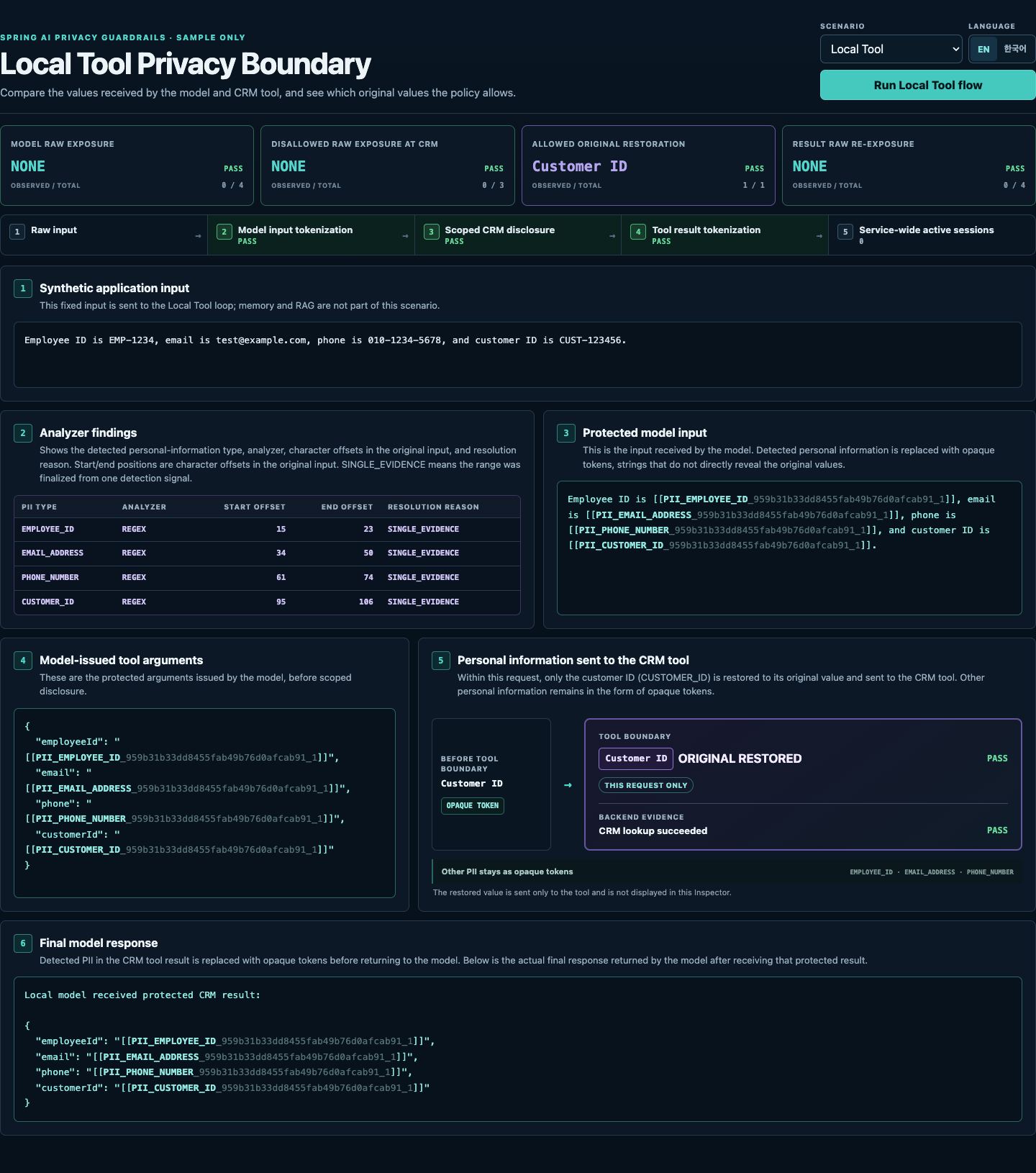
The sample replaces detected PII with opaque tokens, replacement strings that do not directly reveal the original values. Select Local Tool and check the values at each step:
- Model input and tool arguments: The example's employee ID, email, phone number, and customer ID are replaced with opaque tokens. The model uses these opaque tokens in its tool arguments as well.
- Tool execution: The CRM customer lookup tool receives only the original
customer ID (
CUSTOMER_ID) allowed by policy. The other three values remain opaque tokens. - Tool result: Detected PII in the result is replaced with opaque tokens before the result returns to the model.
The "Observed / total" counts at the top of the screen show how many of the
checked example values were found in their original form. For example, 0/4
under "Model raw exposure" means none of the four originals were found at the
model. A count of 1/1 under "Allowed original restoration" means the permitted
customer ID was delivered in its original form. Each metric also shows PASS
or FAIL.
RAG
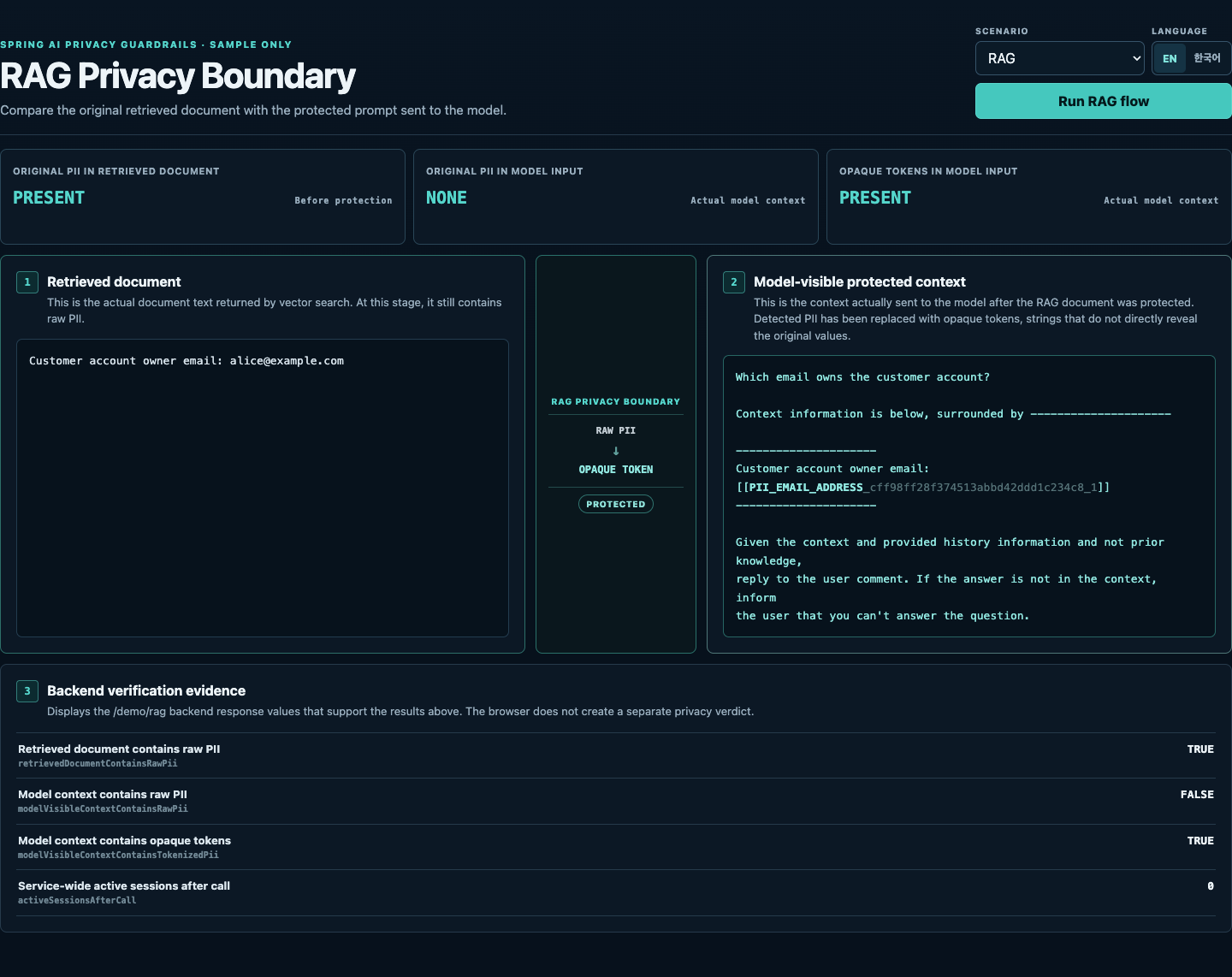
Select RAG and compare the retrieved document with the prompt received by
the model. The document contains alice@example.com; in the model's prompt,
that email is replaced by an EMAIL_ADDRESS opaque token.
The screen displays the original retrieved document alongside the complete protected prompt. The prompt includes the question, prompt template, and retrieved context. The stored document is left unchanged.
The scenario retrieves documents using a local embedding model. It uses no external vector store, embedding service, or LLM.
MCP
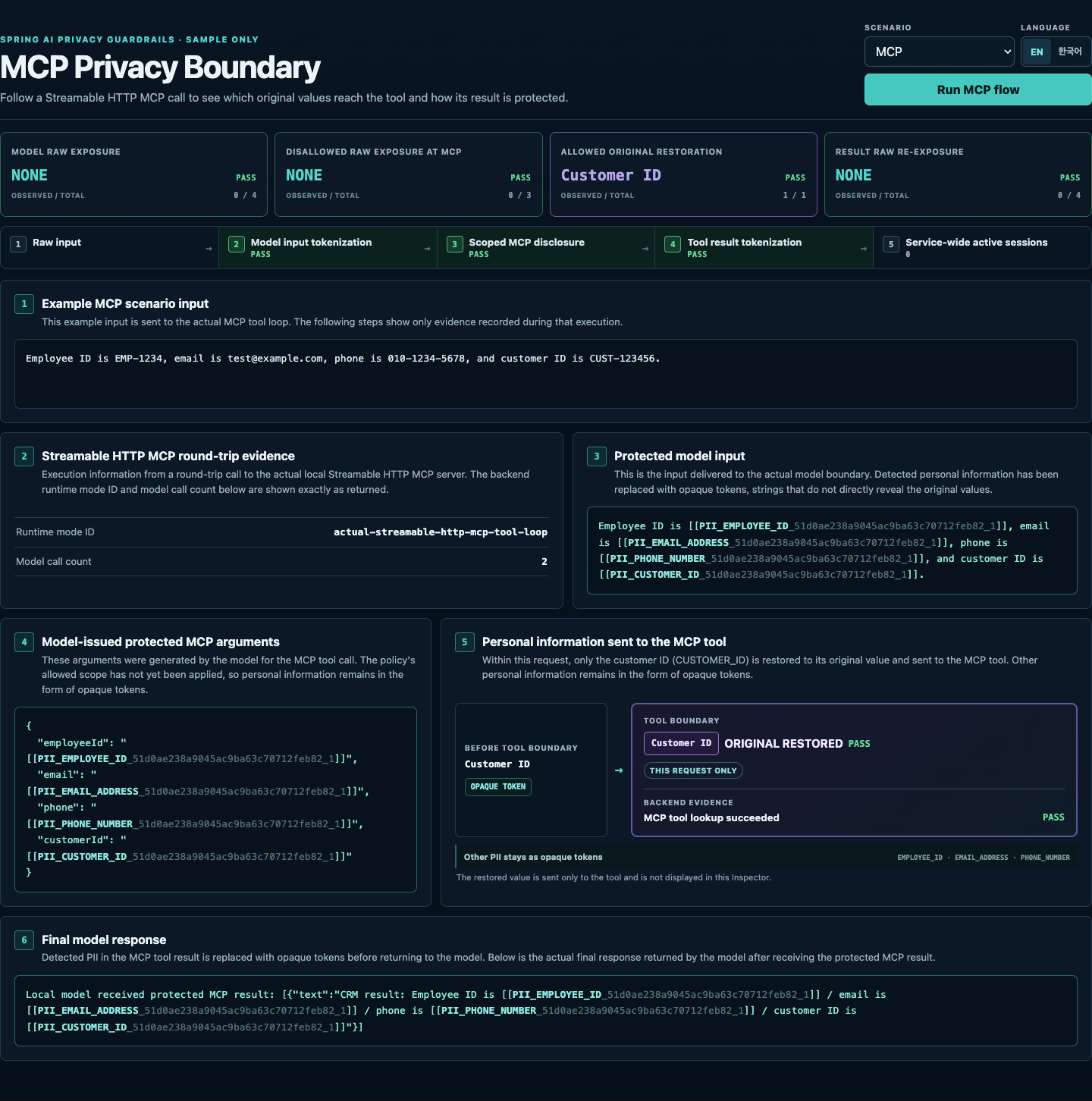
Select MCP to run the customerLookup tool over Streamable HTTP. Check that
the tool receives only the original customer ID (CUSTOMER_ID), the other PII
values remain opaque tokens, and detected PII in the result is protected before
returning to the model.
The sample includes its own local MCP server, so no separately deployed MCP service is needed.
Security
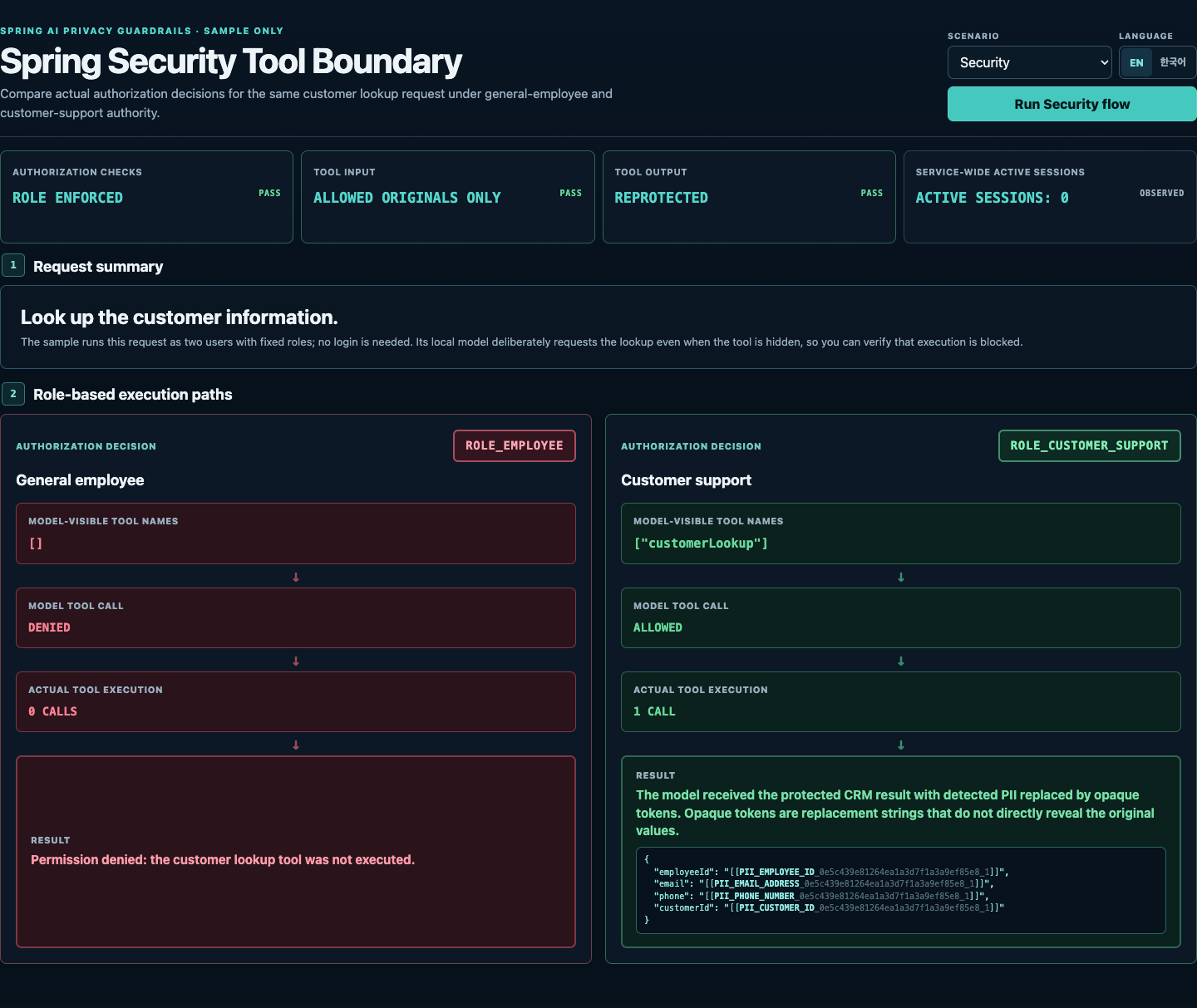
Select Security to compare the same customer lookup request for two sample users:
- General employee (
ROLE_EMPLOYEE): The model's tool list excludescustomerLookup. Even if the model requests it, execution is denied and the tool runs zero times. - Customer support (
ROLE_CUSTOMER_SUPPORT): The model can see and callcustomerLookup. The tool runs once and receives only the customer ID (CUSTOMER_ID) in its original form. Detected PII in the result is replaced with opaque tokens before returning to the model.
The local model deliberately requests the lookup even when it is hidden, so the scenario checks execution blocking as well as tool-list filtering. The sample provides both users and their roles; no login or external authentication service is needed. Tool access and permission to receive original PII are separate policies.
Inspect Results Through the API
Use these APIs to retrieve the results shown in the Inspector as JSON:
| Endpoint | What it returns |
|---|---|
GET /demo/scenario |
Example input in the selected language. |
GET /demo/protect |
PII detection locations and tokenization results for the fixed example, without calling a model. |
POST /demo/protect |
PII detection locations and tokenization results for the JSON body's text field. The text must not be empty or contain only whitespace. |
GET /demo/tool-loop |
Model inputs, tool arguments, protected results, and per-stage checks (boundaryEvidence) from a CRM tool call. |
GET /demo/rag |
The original retrieved document (retrievedDocument) and the complete protected prompt received by the model (modelVisibleContext). |
GET /demo/mcp-tool-loop |
Model inputs, tool arguments, and results from a local Streamable HTTP MCP tool call. |
GET /demo/security-tool-boundary |
Tool visibility, authorization decisions, execution counts for two roles, and privacy checks for the allowed call. |
See the full sample guide for request and response examples, configuration for other analyzers, and instructions for running optional checks with a live model.
EN/KO Runtime Locale
Changing the Inspector's language changes the example input and results as
well as the UI labels. For direct API calls, set the Accept-Language: en or
Accept-Language: ko request header.
- Local Tool and MCP use localized fixed input and final-result wrappers.
- RAG uses localized queries, retrieved-document prefixes, and prompt templates.
- Security uses a localized request summary, example input, and final response.
- Endpoint paths, response field names, code identifiers, and entity types stay unchanged.
POST /demo/protect always analyzes its supplied text; the locale does not
replace custom input.
Interpretation and Verification
The active session count is observed across the service after the call. Concurrent requests can make it nonzero; this value alone does not prove a session leak.
The default Regex rules and all example values are sample-oriented. Text not matched by an enabled analyzer may remain unchanged, and these fixed scenarios do not establish general detection accuracy or prove protection for unsupported execution paths.
For reproducible automated coverage, see the Privacy Boundary Verification Matrix.